Why Database?
Learning objectives
By the end of this lecture you should be able to:
- Explain why spreadsheets and flat files break down as data management tools.
- Define database, DBMS, data dictionary and database application.
- Describe the three-level ANSI/SPARC architecture and the purpose of each schema.
- Distinguish physical data independence from logical data independence.
- Contrast the roles of the data administrator and the database administrator.
1. Problems with Excel
A spreadsheet is the first data store most people reach for. Working example for this section:
the sales workbook superstore_sales_data.xls (available in the VM
ubuntu_databases under /home/ashok/Documents/excel_data/).
Once such a workbook grows, six problems appear.
Spelling errors
The same value — say a partName — may be typed differently in different workbooks, or even in
different rows of the same sheet. Nothing in Excel forces consistency, so "Bearing", "bearing"
and "Bearng" silently become three different things, and any count or total based on them is wrong.
Linking workbooks is not practical
Excel workbooks cannot be linked easily. To answer any question about an entity, all the data about that entity must sit in one sheet. Consider the question:
“Have those students who scored 70% or above in HR and Computers paid their full fees so far?”
Answering it needs marks data and fees data in the same sheet. Extend this to admissions, accounts, performance and extra-curricular activities, and the sheet becomes unmanageable — and full of duplicated data.
No data manipulation language
Even for a single sheet, the only way to find information is to search for it. There is no concise language for expressing “give me the rows that satisfy this condition”.
Updation
There is no simple way to update information. If a course name changes, every cell containing that course name must be found and edited — and a missed cell becomes an inconsistency.
Security
Excel has no security model. Anyone who can read a sheet can also modify or delete it. There is no notion of “read the name column but not the salary column”.
Big data / scalability
A spreadsheet is fine for a few columns and roughly a hundred records. With many thousands of records and a large number of columns it becomes clumsy, slow and difficult to work with.
Excel macro vs. SQL — the same task
Deleting rows whose key cell is empty. First, the VBA macro an Excel user must write:
Sub DeleteEmptyRows()
    SelectedRange = Selection.Rows.Count
    ActiveCell.Offset(0, 0).Select
    For i = 1 To SelectedRange
        If ActiveCell.Value = "" Then
            Selection.EntireRow.Delete
        Else
            ActiveCell.Offset(1, 0).Select
        End If
    Next i
End Sub
The equivalent statement in SQL:
DELETE FROM mytable WHERE customerID IS NULL;2. Problems with flat files
Flat files may be spreadsheet files or plain text files (for example AdventureWorks Sales.xlsx in a
Power BI tutorial folder). File-based systems, where each application owns its own files, suffer three
characteristic problems.
File incompatibility
Different departments need the data arranged differently. One application may need customer details in alphabetical order, another in ascending customer number, another in descending order. Each ordering tends to become its own file.
Difficult to control access
Some applications need more data than others. A credit-control application needs customer credit-limit information; a delivery-note printing application needs only name and address. Yet the file must still contain the extra information for the application that requires it — so the restricted application sees it too.
Difficult to implement concurrency
While a data file is being processed by one application, it is unavailable to other applications and to ad hoc queries. If more than one application were allowed to alter the file at once, updates could clash. File-based systems dodge the problem by allowing only one application at a time; database systems solve it properly through concurrency control.
3. The database approach
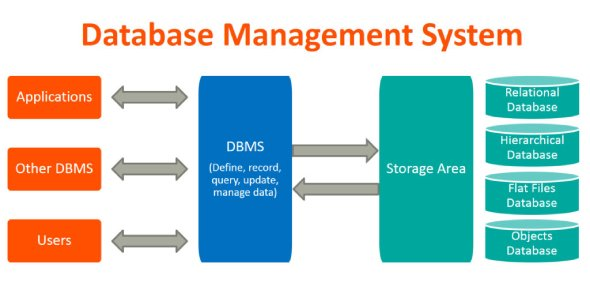
Key terminology
- Database — a collection of related data arranged in a tabular format.
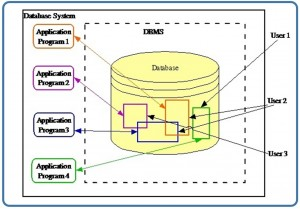
- Database management system (DBMS) — a software system used to create and manage databases. Such software is complex and made up of a number of distinct components. The term database system is usually an alternative term for DBMS.
- Data dictionary — the description of the data held in the DBMS, also called the
system catalogue or
information_schema. It may also hold access information. - Database application — a program, or related set of programs, that uses the DBMS to perform the computer-related tasks of a particular business function, such as order processing.
What a DBMS gives us
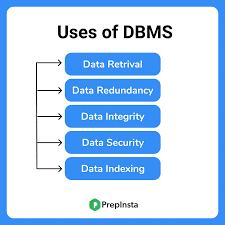
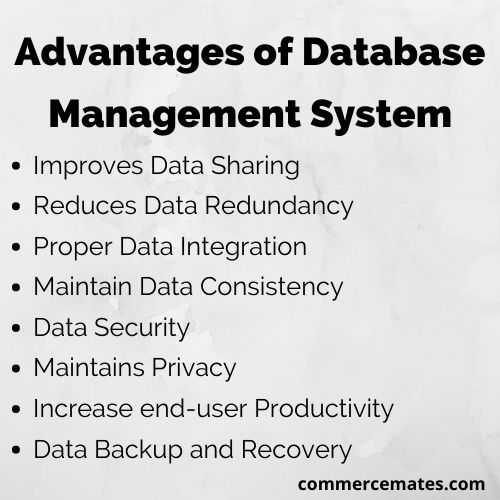
Read these two lists against Sections 1 and 2: every advantage on the right is the direct answer to a problem raised by spreadsheets or file-based systems — redundancy, inconsistency, weak security, no concurrent sharing, no recovery.
4. Three-level architecture
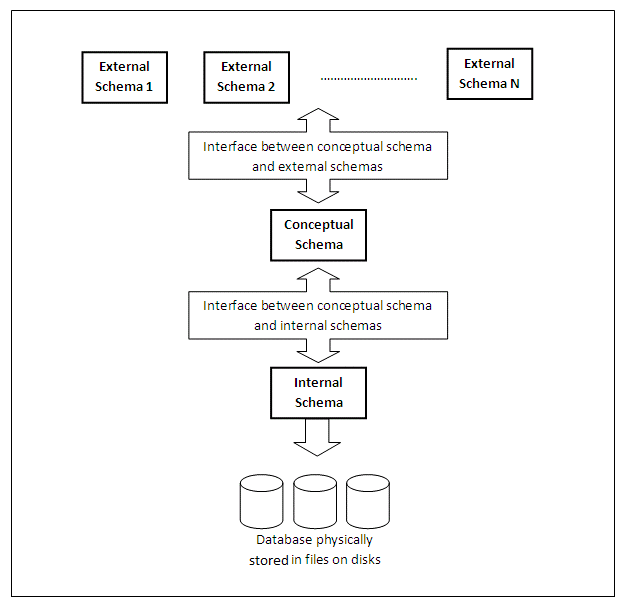
A schema can be taken to mean a set of fields. The architecture has three levels of schema.
The external schema
The external schemas describe the database as it is seen by the user and by user applications. For example: user1:
[studentName, avgMarks], user2:[studentName, minMarks], user3:[studentName, subjectWiseMarks]. The external schema maps onto the conceptual schema.There may be many external schemas, each reflecting a simplified model of the world as seen by particular applications. External schemas may be modified, or new ones created, without altering the physical storage of data — the interface between the external and conceptual schemas absorbs the change.
The external schema lets application programs see as much of the data as they require while excluding items irrelevant to that application, providing a view that matches the nature of each task.
It is more than a subset of the conceptual schema: items must be derivable from the conceptual schema, but that derivation may be complicated, involving computation and other activities.
The conceptual schema
The conceptual schema describes the universe of interest to the users of the database system. For a company it describes all the data required to be stored. From this organisation-wide description, external schemas can be derived for specific users or particular tasks.
At this level we are concerned with the data itself, rather than with storage or with how data is physically accessed on disk — those are the preserve of the internal schema.
The internal schema
A database has only one internal schema, containing definitions of the way data is physically stored. The interface between the internal and conceptual schemas identifies how an element (for example, an integer) in the conceptual schema is stored and how it may be accessed.
If the internal schema changes, the internal–conceptual interface handles it; the conceptual and external schemas need not change. So changes of storage device and of file organisation are transparent to users and application programs.
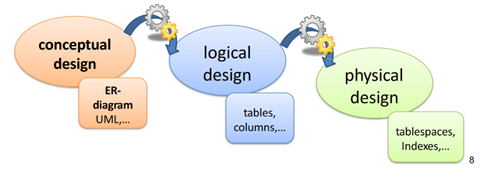
Note that “logical” versus “physical” depends on who is speaking. Database designers may regard relations as logical and the database itself as physical, while a systems programmer may consider data files logical in concept and their implementation on magnetic disks — cylinders, tracks and sectors — as physical.
5. Data independence
First, the opposite case: data dependence
There are two files — an index (file1) holding a pointer, and a data table (file2).
We want the salary of cairon.
file1 — index on name
| name | rowNo |
|---|---|
| ashish | 5 |
| bhim | 2 |
| cairon | 4 |
| dany | 1 |
| eska | 3 |
file2 — data table
| name | age | salary |
|---|---|---|
| dany | 23 | 10k |
| bhim | 25 | 09k |
| eska | 40 | 30k |
| cairon | 45 | 56k |
| ashish | 35 | 32k |
The answer depends on knowing that an index file exists: open the index file, read it top-down until the name
cairon is found, read the rowNo value, then open the data-table file, go to that row and
read the salary.
Written as pseudo-code:
Open file1
rowno = 1

begin loop
    read row at rowno:
        name   := read name
        target := read rowNo
    if name = 'cairon' break loop
    else rowno = rowno + 1
loop

Open file2
goto target
read salary
If the index file had been built on age rather than on name, this whole approach would
have to change. That is dependence on the way files are stored and arranged.
In a DBMS environment, the DBMS takes care of the physical storage details. All one has to write is a query:
get salary of person whose name is 'cairon'
Physical and logical data independence
Physical data independence
In a database environment, a requirement to change the structure of a particular file of data held on disk is recorded in the internal schema. The interface between the internal and conceptual schemas is amended to reflect it, but the external schema need not change. Such changes of physical data storage are therefore invisible to users and application programs, which removes the problem of physical data dependence.
Logical data independence
Any change to the conceptual schema — for examplefloattodouble— can be isolated from the external schema and the internal schema; the change is reflected in the interfaces between the conceptual schema and the other levels. Effectively, changes can be made at the conceptual level, where the overall model of an organisation's data is specified, independently of both the physical storage level and the external level seen by individual users.
6. Actors on the scene
Data administrator
Data is one of an organisation's most valuable assets, so someone must own it. The data administrator has a good knowledge of the company, its divisions and the data they process. They understand the importance of data flowing through the various units, know its security implications and decide what data should be stored in the database. This is a non-technical role — closer to a business analyst — and it lays down security and access policies.
Database administrator
The DBA is the technical counterpart, and:
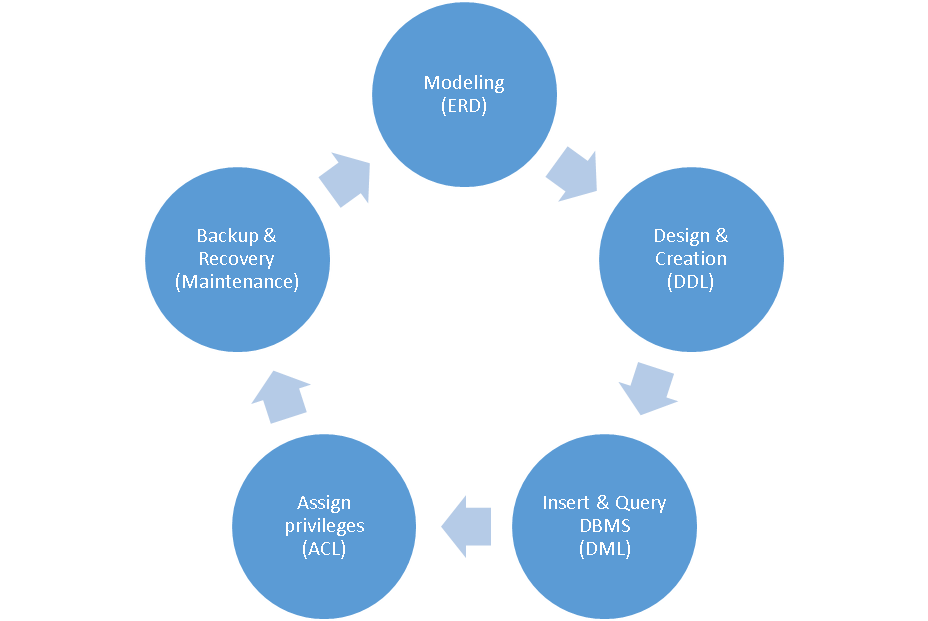
- Coordinates all activities of the DBMS.
- Understands user requirements and defines the database structure (the schema).
- Decides the storage structure.
- Defines user roles and grants privileges.
- Specifies integrity constraints.
- Monitors performance and responds to changing transaction volume or requirements.
- Handles backup and recovery.
- Secures the database.
Summary
- Spreadsheets fail on consistency, linking, querying, updating, security and scale.
- File-based systems add incompatibility between departmental files, coarse access control, and an inability to support concurrent update.
- A DBMS centralises data, describes it in a data dictionary, and serves many applications and users at once.
- The three-level architecture separates the user's view (external), the organisation's model (conceptual) and the storage details (internal).
- That separation is what delivers physical and logical data independence.
- The data administrator decides what data the organisation keeps; the database administrator makes it work.
Review questions
- Give two distinct reasons why the “students who scored 70%+ and paid full fees” question is awkward in Excel but easy in a DBMS.
- Rewrite the
DeleteEmptyRowsmacro's intent in one sentence without describing any loop. Which property of SQL does this illustrate? - Why do file-based systems traditionally forbid two applications from opening the same file for update?
- A DBA moves a table from one disk to a faster one. Which schema changes, and which application programs must be rewritten?
- A column's type changes from
floattodouble. Is this physical or logical data independence at work? Justify your answer. - Classify each as data administrator or database administrator work: granting
SELECTto a role; deciding that customer credit limits are confidential; scheduling nightly backups.